
AI Collaboration Format Reports
On this page
Starting October 30, 2026, tests that include the AI Collaboration format also have a new report based on the Skill Index. The score and rank in the new report are based on an evaluation of the process behind the candidate's work. Deliverable Evaluation remains available as before. This page explains what changes in the new report, what the score, rank, and evaluation coverage mean, and how to choose between the new and legacy reports. For the legacy report, see AI Collaboration Format Reports (Legacy Report).
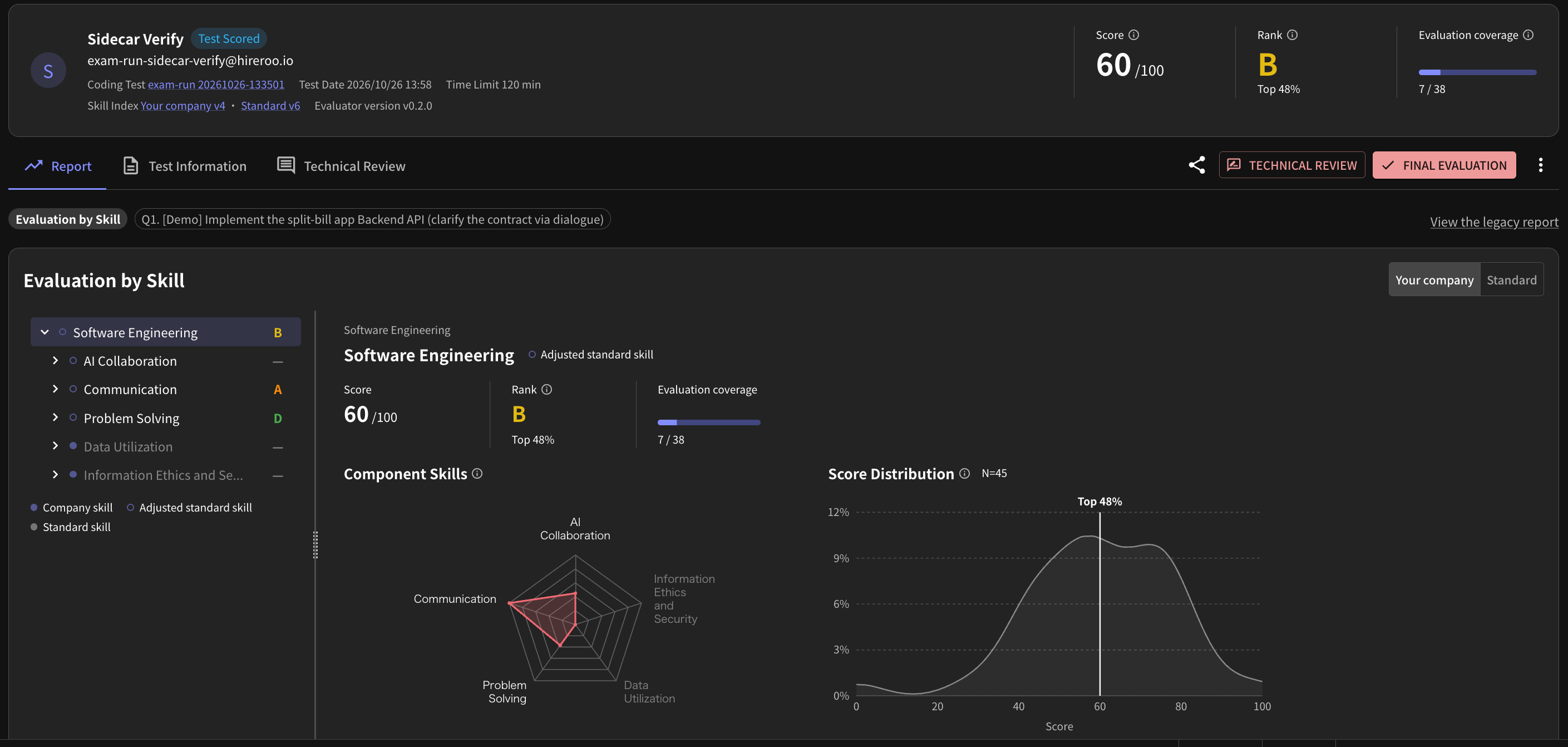
The new report screen.
What changes in the new report
- The score and rank are now based on the Skill Index. Until now, the score came from Deliverable Evaluation (requirement fulfillment rate). In the new report, the score and rank come from an evaluation of the behavior observed during the candidate's work.
- Evaluation is per test, not per problem. Even when a test has multiple problems, the results of all AI Collaboration problems are combined into a single score, rank, and evaluation coverage.
- You can trace the evidence on one page. From the overall score, you can drill down through skills and evaluation items to the results for each problem.
- The candidate list also shows the new score and rank. During the transition period, they appear alongside the legacy score and legacy rank.
SEI is the name of the Skill Index that HireRoo provides as its standard. The score in the new report is based on your company's published Skill Index if you have one, and on SEI otherwise. For details, see What is SEI (Software Engineering Index)?.
How to read the score, rank, and evaluation coverage
Score
The score ranges from 0 to 100 and is based on the Skill Index. If your company has created and published its own Skill Index, the score is based on your company's Skill Index. Otherwise, it is based on the HireRoo standard Skill Index.
The score is evaluated per test, not per problem. When a test has multiple problems, the results of all AI Collaboration problems are combined to calculate a single score.
Rank
The rank is determined by where the score falls, as a percentage, among all reports at the time the report was generated.
| Rank | Criteria |
|---|---|
| S | Top 5% |
| A | Top 25% |
| B | Top 50% |
| C | Top 75% |
| D | Below that |
- The rank does not change after the report is generated.
- When fewer than 30 candidates were compared, the rank and top percentage are not shown.
Evaluation coverage
Evaluation coverage shows how many evaluation items the score is based on. The wider the coverage, the more evaluation items the score reflects. Coverage rarely reaches 100%.
Depending on the content of the problem and how the candidate worked, some evaluation items cannot be evaluated. Items that were not evaluated are not included in the score calculation. Read a score with narrow coverage as a result for only the range that could be evaluated.
Skills and evaluation items
You can review the score for each level of the skill hierarchy. Each skill is broken down into evaluation items. For each evaluation item, you can see which level (L0 to L4) the candidate reached against the evaluation criteria. If your company has its own Skill Index, you can switch between your company's and the HireRoo standard to compare.
Requirement fulfillment rate and SEI
| What it evaluates | |
|---|---|
| Requirement fulfillment rate | The submitted deliverable: the test case pass rate. It has the same meaning as "Requirement Fulfillment" in the legacy report |
| SEI (Skill Index) | The behavior observed during the candidate's work |
Deliverable Evaluation (requirement fulfillment rate) remains available for each problem as before. The score and rank in the new report evaluate the process.
Candidate list
The candidate list shows the new score and new rank alongside the legacy score and legacy rank. Because the calculation method and the comparison group differ between new and legacy, they are not merged into a single value.
- The new score and legacy score use different calculation methods. The legacy score is calculated with the previous scoring method, applying the weights configured for the coding test to the score of each problem.
- Immediately after a test is completed, the new score and new rank are blank. They appear once the new report has been created.
Choosing between the new and legacy reports
This applies to tests that include the AI Collaboration format.
Which report is shown
| Test composition | Report shown by default | Switching |
|---|---|---|
| AI Collaboration format only | New report | You can switch to the legacy report |
| AI Collaboration format plus other formats | Legacy report | You can switch to the new report |
| No AI Collaboration format | Legacy report | You cannot switch to the new report |
The same rules apply to tests taken in the past.
For a test that includes both the AI Collaboration format and other formats, the new report covers only the AI Collaboration problems. Review the other formats' problems in the legacy report.
Switching reports
- From legacy to new: Select "View the new report" at the top of the legacy report.
- From new to legacy: Select "View the legacy report" at the top of the new report.
What stays the same
- PDF: Even with the new report, PDFs are still exported with the content of the legacy report.
- Technical review: As before, you can review it in the "Technical Review" tab. It is not included in the score or rank.
- Sharing: Sharing from the share button works the same as before.